What is a Process Step Builder?
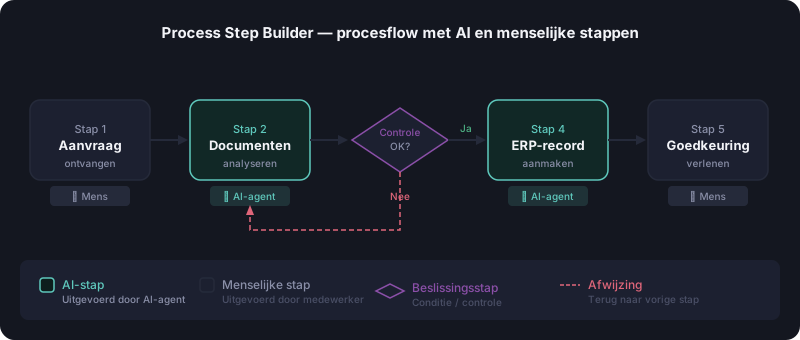
A Process Step Builder is a structured tool that allows you to build a business process step by step through AI guidance — including inputs, outputs, decision points, responsibilities and AI opportunities per step.
A Process Step Builder is an AI-guided tool for building a business process step by step through text or voice — no BPMN knowledge required. The result is a living process model with inputs, outputs, decision points and AI opportunities per step. An average core process of 8–15 steps takes 20–40 minutes to build.
How is a Process Step Builder different from BPMN?
BPMN (Business Process Model and Notation) requires a certified analyst, specialist software and weeks of work. A Process Step Builder is accessible to everyone: you describe your process in plain language and the AI structures it into a formal process model.
What does a Process Step Builder capture?
- Process steps with name and description
- Inputs and outputs per step
- Human tasks vs. AI tasks per step
- Decision points and conditions (if/then logic)
- Roles and systems involved
- ERP triggers for integration with Business Central
Process Step Builder in Business Design Studio
The Process Step Builder is the core of the process workshop in Business Design Studio. You build the process flow by voice or text. The AI suggests the best specialist for each AI step and then conducts a quality review before you proceed to the canvas phase.
How to use the Process Step Builder?
- 1Start a process workshopOpen Business Design Studio, go to the workshop environment and start a new process workshop. Give the process a name and describe its goal in one sentence.
- 2Describe process steps by text or voiceDescribe each step in plain language — by typing or speaking. The AI automatically structures your description into a formal process step with inputs, outputs and involved systems.
- 3Confirm AI opportunities per stepThe AI facilitator suggests which steps can be performed by AI agents and which type of agent is most suitable. Confirm or adjust the suggestions.
- 4Complete the quality reviewThe AI facilitator leads a quality review: check completeness, logical order, decision points and RACI assignment per step.
- 5Export to canvas or ERPAfter approval, export the process flow to the canvas phase for detailed elaboration, or directly as a configuration package to Microsoft Business Central.
Process Step Builder vs. BPMN vs. Flowchart
| Tool | Knowledge required | Lead time | Output | ERP/AI integration |
|---|---|---|---|---|
| Process Step Builder | None — plain language sufficient | 20–90 minutes | Living model + RACI + KPIs + AI agents | Built-in — directly exportable |
| BPMN | BPMN certification required | Weeks | Static diagram (XML) | Not built-in — separate integration |
| Flowchart | None | Hours | Static diagram (visual) | Not built-in |
For operational process design with AI opportunities, the Process Step Builder is the most complete solution. BPMN is better for complex enterprise architecture.
Frequently asked questions
See this concept in action
Business Design Studio applies all these concepts in a voice-driven AI workshop — try it free with no registration required.
Try free demo